June 9, 2026
5 skills I wrote for my next solo AI project
When I started writing Colorín — my practice app to get familiar with AI — I was an AI novice. Everyone was. This was January 2026. Since then, many things have evolved. New models have been introduced. People are finding new ways to invite AI to the table in every aspect of our work.
Skills have been a particularly hot topic, but I largely ignored them in this first project — agreeing with the sentiment that you can get 90% of the benefit of AI by just prompting models. So I used Claude Code out of the box, with a CLAUDE.md file I really didn’t know what to put in. I fed in design docs created alongside Claude chat sessions started with only the prompt “You’re a Staff mobile engineer consulting to plan projects with an indie app development studio…”
It all worked mind-blowingly well.
But everyone’s saying we can do better, so I’m going to try.
Before my next project, I’ve stepped back to take in the big picture of AI in mid-2026. To read documentation, take classes (this one from DeepLearning.AI was an excellent overview of the advanced features I’d been ignoring since the start), watch YouTube. I finally understand the difference between an MCP server and a skill. I understand what someone’s talking about when they say agent and sub-agent. I know about “progressive disclosure.”
And I still stand by my opinion that you can get 90% of the way there without all this fancy stuff. But I can do better.
Here are the 5 skills I’m using in my next project.
For design
1. Screenshot to design system
This is something I copy-pasted around to different systems time and time again. First it was in my notes app, then in the CLAUDE.md, then finally translated properly into code. Let’s create a way to pull the design system out of a screenshot and get it into your repo — tracked, versioned, and committed as quickly as possible.
Given a screenshot or a set of screenshots (could even be a Figma flow capture), it determines a design system. It eliminates one-off color and font usages, and works with you to fill in the gaps. In the final step, it exports an HTML file so you can preview your system in action.
2. UI-driven design skill
I wrote this in an effort to standardize the way I was already working. Once I had the high-level idea and requirements, I’d build a UI mockup in Google Stitch (still in beta, but solid). These near-pixel-perfect mockups went a long way. I’d have Claude write a spec for each feature from just the mockups — filling in the blanks with questions. This skill draws heavily on Matt Pocock’s /grill-with-docs skill, but instead of just written language, you get the added input of visual language.
If you use skill 1 to define a design system first, you get even more benefit. You can feed in hand drawn or lo-fi mockups and the skill will draw from the design system to create a finished product.
For cross-app porting
3. Build port graph
The port to Android was equally magical and messy.
Magical because, after over a decade as an iOS engineer — working alongside Android counterparts building the same thing — I was building it myself. I didn’t have to understand the specifics of the platform; I was using my high-level engineering sense to get it built. It was pretty incredible.
Messy because there was so much to manage in my head. What feature do I port first? Am I forgetting any decisions I made on iOS that need to be translated to Android? That’s where the port graph should help next time around. Feed it the iOS app and it generates a Mermaid diagram — what to translate, in what order, and how it all depends on each other.
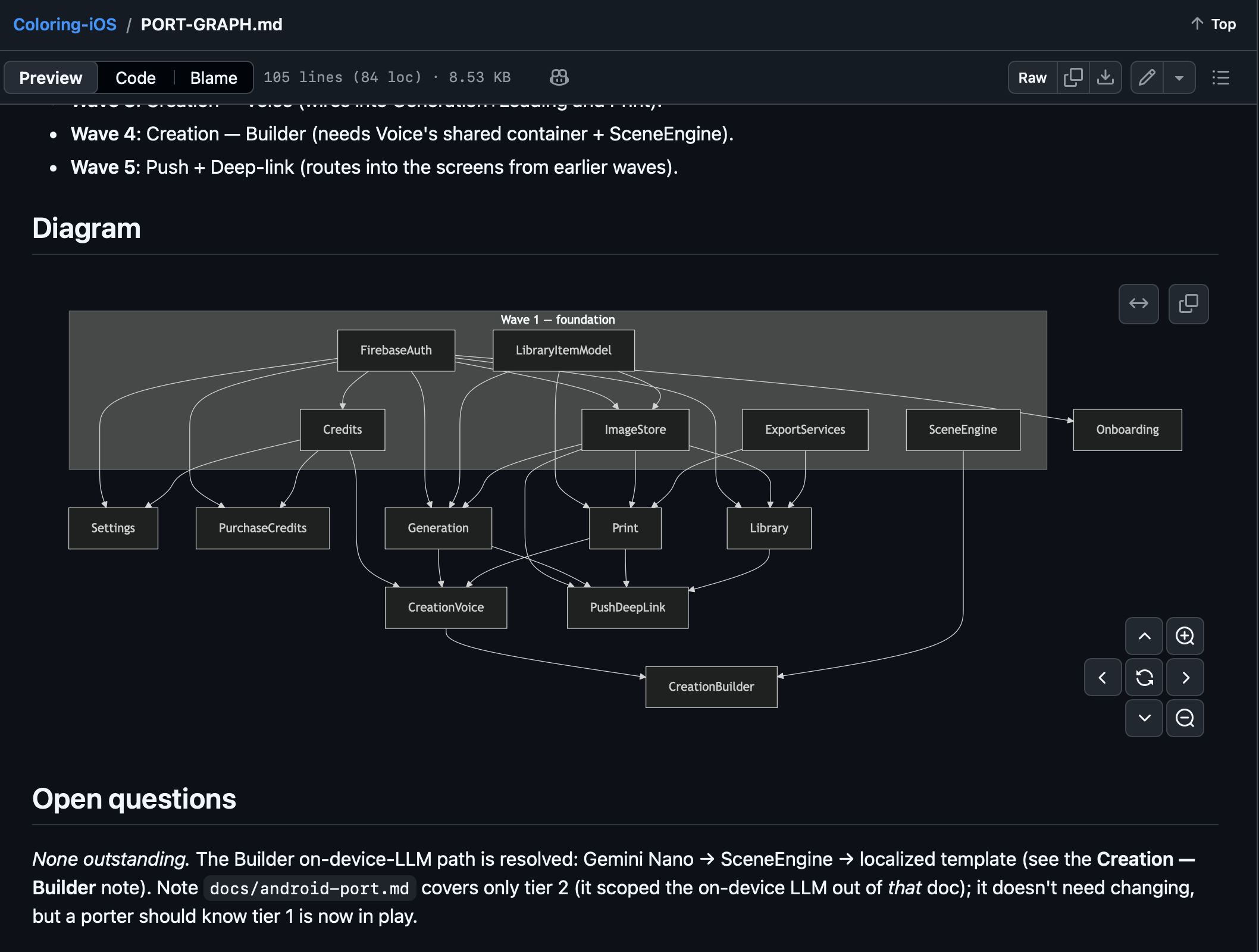
4. A cross-platform export spec
This is the most complex of all the skills. The one that promises the most, but has the potential to underdeliver.
It ingests the output of the port graph and builds a spec you can hand to a coding agent to implement on the other platform. Platform differences being what they are, there will be questions — and the skill asks them exhaustively before it writes anything.
My first instinct was to reach for sub-agents: fan each feature out to its own copy and generate the specs in parallel. I built it that way. Then I hit a wall — a sub-agent can’t ask for human input. So all those questions the skill is supposed to grill me with? They never got asked. The specs came out the other side having quietly answered everything itself.
So I backed out. No sub-agents — just a single agent that can actually stop and ask me what it needs to know.
I’ve tested creating the specs. I haven’t tested actually using them — handing one off and seeing what gets built. That will be a task for my next project. And I’ll report back here.
For app hardening
5. Accessibility audit skill
Accessibility is something that often gets left as a last step. A finishing touch. Sometimes it’s forgotten or delayed past launch entirely. And I think it’s okay to be a finishing touch — accessibility code can be long, cumbersome, and repetitive. This skill helps identify issues so you can fix them and move on. It creates a dashboard of all the issues.
The beauty is it can be invoked many times. As a first pass, and then later on to check whether new code has introduced any more bugs.
It doesn’t replace manual accessibility testing — there can still be a lot of bugs found when actually using the app. It only has access to the code. But it’s a great starting point for apps that lack, or are light on, accessibility features.
A bonus skill: voice-preserved writing
I developed this one as I was writing the articles I’ve published here. I’m a pretty good writer, but I often start off pouring my thoughts out onto the page. That part comes fast. Then the bulk of my time is spent editing, tweaking, digging deeper when needed. I wondered if there was some way AI could help me do this — without making me sound like a machine. (Unfortunately for me, I really do love to use em dashes.) Thus, this skill was born.
First, it takes your draft and organizes it. It has you approve the flow. Then it digs deeper, asking you questions. It’s specifically instructed not to add anything — only to edit. If there isn’t enough content, or part of the piece doesn’t dig deep enough, it asks you for more.
So far, I’m loving it. I used it to write this very post. I hope it can help you with your writing too.
In this strange new world, we’re treading a thin line between preserving human thoughts and emotions and turning everything over to AI. I think this skill is a great illustration of how you can use AI to enhance you. To make you think deeper. To guide you. Not to replace thought and opinion.

Final thoughts
I really enjoyed taking a step back to learn more about these advanced features of AI. I hope the skills I wrote here will help me — but they’re mostly untested. I expect to adapt them as I work through my next project.
There’s a question I keep circling, though. Do these things need to be skills at all? Anthropic, writing about skills, mostly uses deterministic, testable examples. Skills used as a way to automate a repeatable task. Something exact. It’s easy to measure success.
And none of the skills I wrote are deterministic. They’re opinionated. You can run them twice and get slightly different results each time. Does that mean they shouldn’t be skills at all?
I’ve landed on: yes, the value is there — it’s just hard to quantify. Screenshot-to-PRD is something I did many, many times over, and a skill makes the results more consistent. Are they actually better? I can’t say for sure without extensive A/B tests, and I don’t have the bandwidth for that right now. But logically, it should be an improvement.
I also spent more time on all this than I expected, or wanted to. It’d be easy to keep optimizing and re-optimizing these to the point of procrastinating the real work. The LLMs are excellent at coding out of the box. They’re even good at most of these tasks out of the box. Only use and time will tell whether these skills actually add meaningful value.
All of them are up on my GitHub — try them out, and give me feedback. If something’s not working, submit an issue, or even a PR.
Will keep you updated. On to the next project.